
The #1 Top Rated WordPress Database Cleanup Plugin
Advanced Database Cleaner
The best plugin to clean & optimize your WordPress database with ease, delete orphaned options, tables, etc. Automate cleanups, get analytics, and more. Make your website run smoothly with a clean database.

Choose Your Plan
Choose the plan that best fits your needs and start cleaning your site today!
Starter
Buy Now
-
License for 1 site The number of sites you can activate and use the plugin on with this plan.
-
All premium features Access to all advanced features and premium functionalities of the plugin.
-
10 daily remote scan credits Remote scan credits let you call our cloud-based SmartScan™ system; a curated remote database that analyzes your items with much higher accuracy in detecting ownership. Each time you perform a remote scan, one credit is used.
-
Standard support Standard support includes help with installation, setup, general usage, and resolving issues.
-
Technical support Technical support provides personalized assistance, including a direct review of your database to help identify and verify data that can be safely cleaned.
-
Compatible with Multisite Multisite compatibility lets you manage and use the plugin across all sites in your WordPress network from a single dashboard.
Standard
Buy Now
-
License for 5 sites The number of sites you can activate and use the plugin on with this plan.
-
All premium features Access to all advanced features and premium functionalities of the plugin.
-
30 daily remote scan credits Remote scan credits let you call our cloud-based SmartScan™ system; a curated remote database that analyzes your items with much higher accuracy in detecting ownership. Each time you perform a remote scan, one credit is used.
-
Priority support Priority support ensures your inquiries are addressed promptly, providing faster assistance for your needs.
-
Technical support Technical support provides personalized assistance, including a direct review of your database to help identify and verify data that can be safely cleaned.
-
Compatible with Multisite Multisite compatibility lets you manage and use the plugin across all sites in your WordPress network from a single dashboard.
Agency
Buy Now
-
License for unlimited sites The number of sites you can activate and use the plugin on with this plan.
-
All premium features Access to all advanced features and premium functionalities of the plugin.
-
500 daily remote scan credits Remote scan credits let you call our cloud-based SmartScan™ system; a curated remote database that analyzes your items with much higher accuracy in detecting ownership. Each time you perform a remote scan, one credit is used.
-
Premium support Premium support provides top-priority assistance with rapid, effective issue resolution, including coverage during weekends and holidays.
-
Technical support Technical support provides personalized assistance, including a direct review of your database to help identify and verify data that can be safely cleaned.
-
Compatible with Multisite Multisite compatibility lets you manage and use the plugin across all sites in your WordPress network from a single dashboard.

100% No-Risk, 30-Day Money-Back Guarantee
Try it with complete confidence. If the plugin doesn't deliver the results you expect, we'll refund your purchase in full within 30 days. No conditions, no stress - just your money back.

Clean, Optimize & Speed Up
Your WordPress Database
Everything you need to clean, optimize, and maintain your WordPress database in one powerful plugin
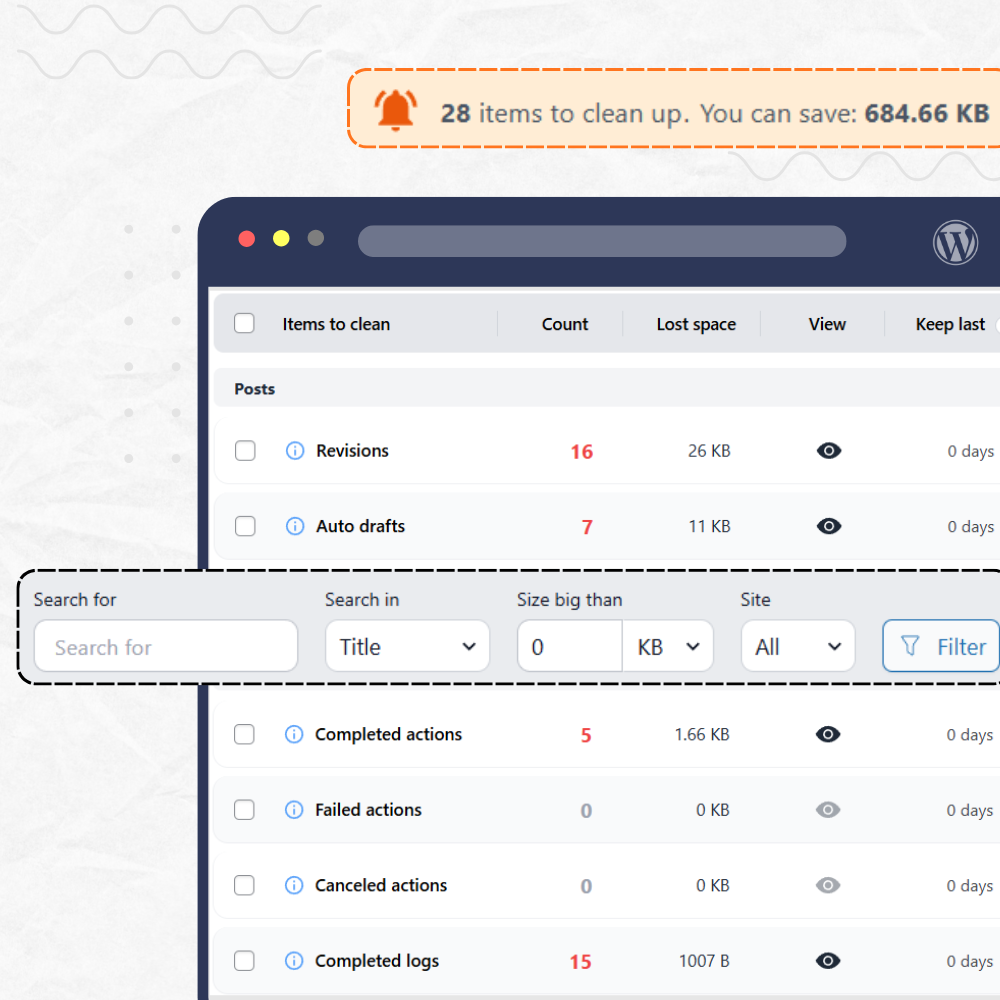
28 Cleanup Tools at Your Fingertips
Clean WordPress database bloat and boost site performance. Remove revisions, auto-drafts, expired transients, unused post/user meta, Action Scheduler leftovers, and more.
- Real-time counts of items ready to clean
- Calculate lost space for each item
- Preview items before deleting using a view mode
- Keep last n items (or x days) to preserve recent data
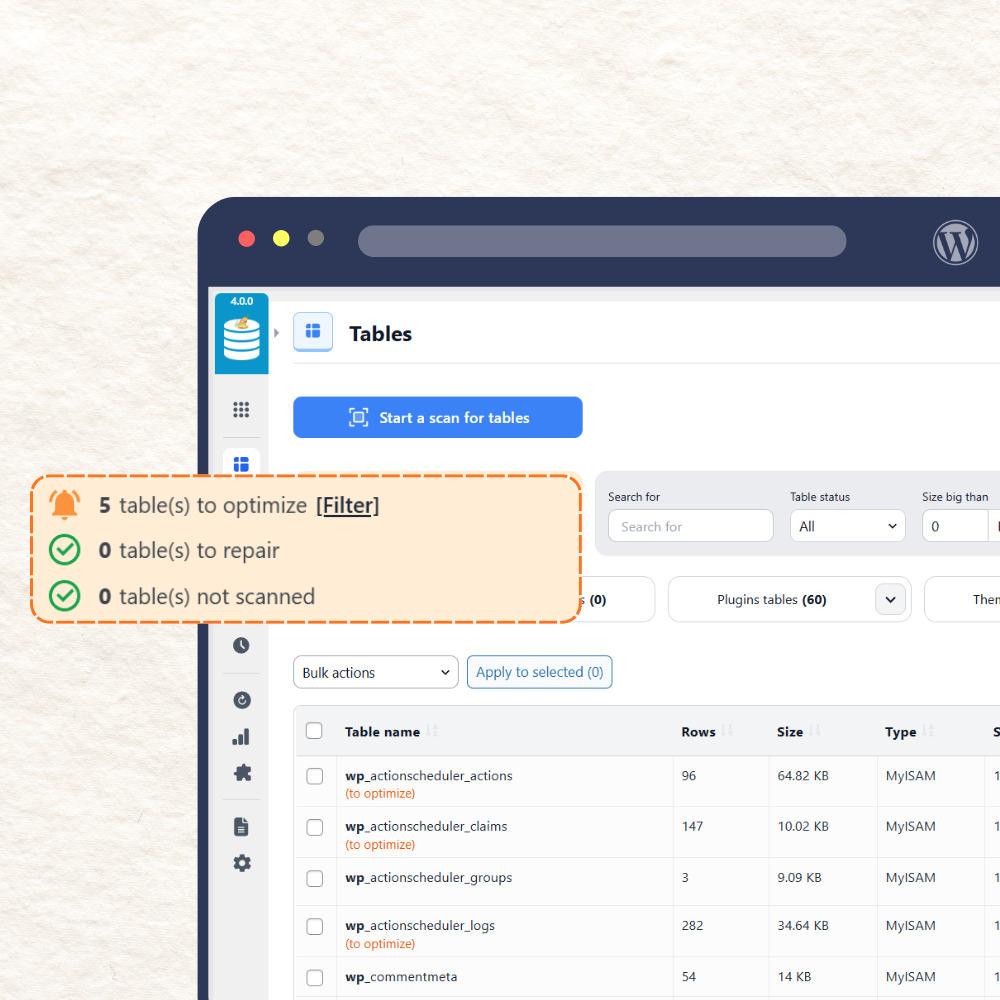
Tables cleanup : Optimize, Repair & Remove Orphaned Tables
View all WordPress tables with row counts, sizes, and overhead. Optimize, repair, delete, or empty tables instantly, and identify orphaned tables belonging to deleted plugins and themes.
- Quick Optimize and Repair actions per table
- Detect tables with invalid prefixes
- Identify orphaned tables from old plugins & themes
- Smart filtering to find tables needing attention
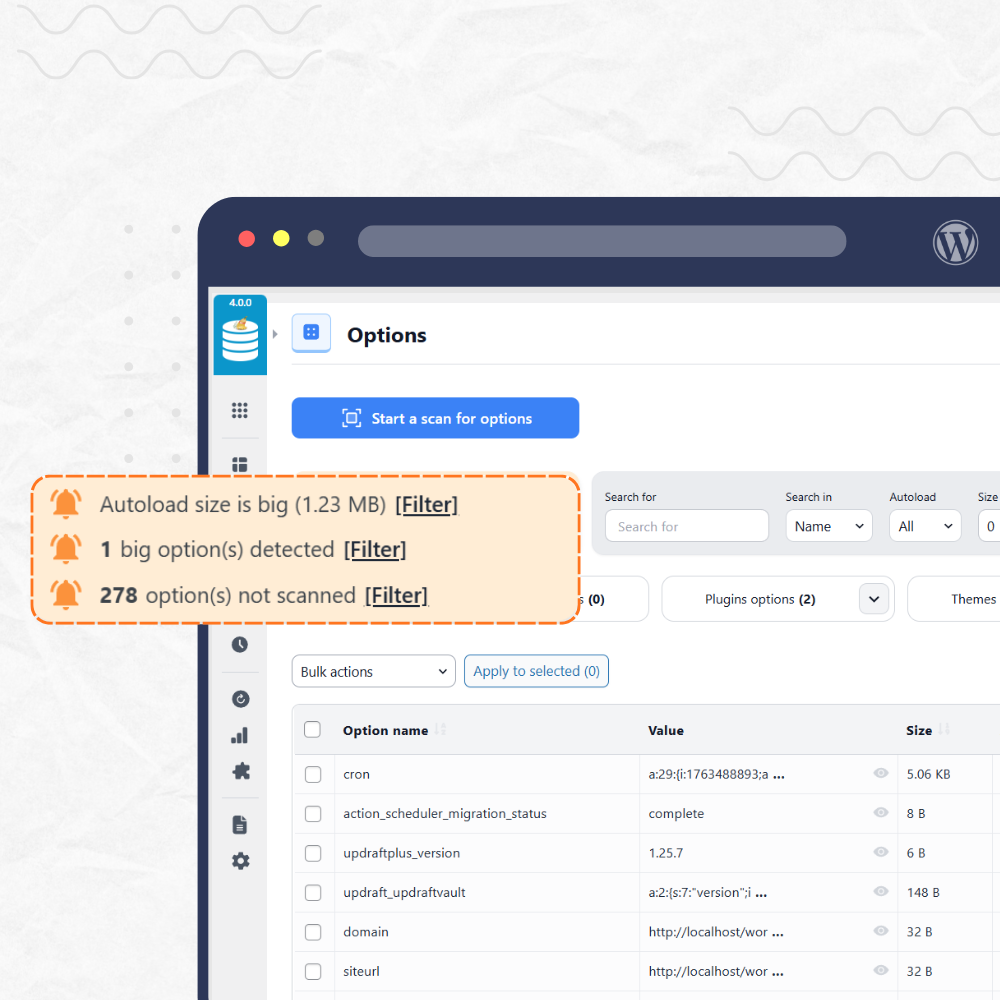
Options Cleanup : Reduce Autoload size and Remove Orphaned Options
Browse all WordPress options, identify heavy autoloaded entries, and safely remove leftover options from old plugins and themes.
- Instantly see if your autoload size is too big
- Highlight large options that consume memory
- Identify orphaned options from old plugins
- Flip autoload value to "off" in one click
- Use filters to Search options by name, value, etc.
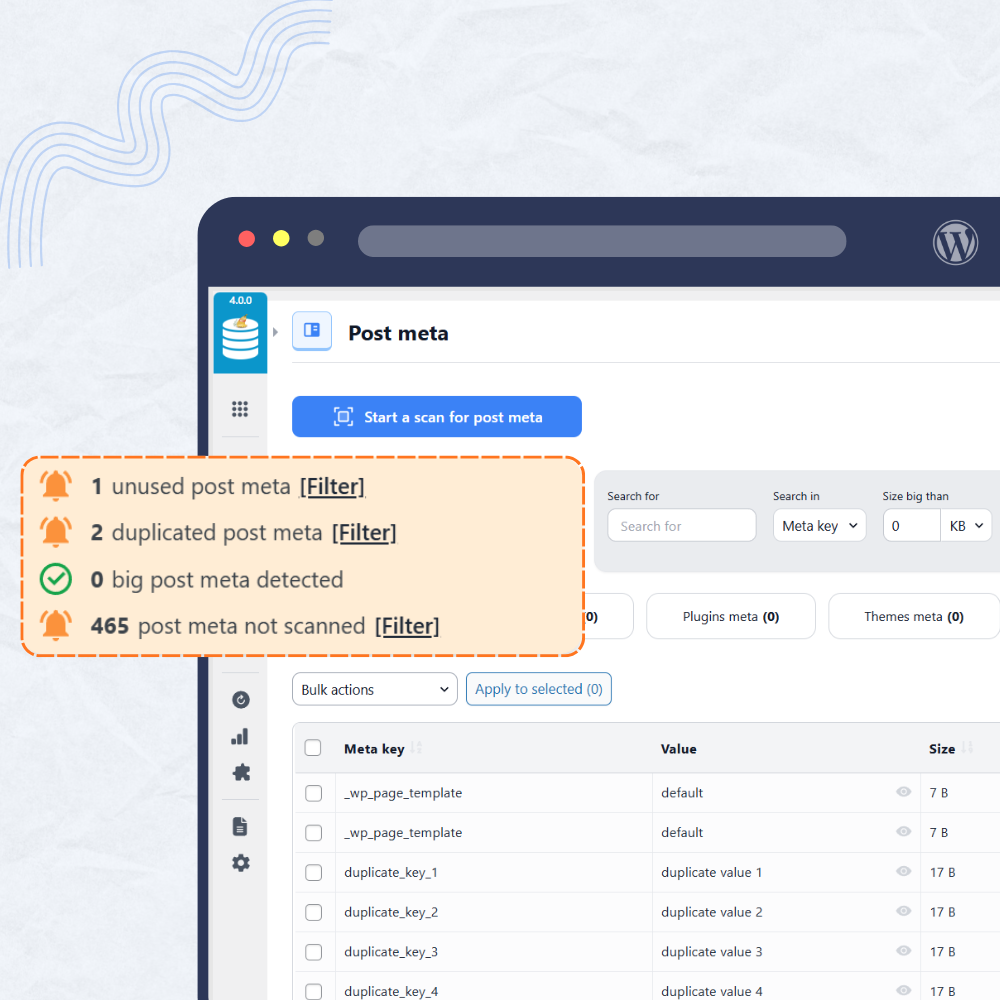
Post & User Meta Cleanup : Eliminate Orphaned and Unused Meta
View all post WordPress and user meta fields, detect unused or duplicated data and clean them without affecting your live content or users.
- Detect unused meta from deleted posts/users
- Detect duplicated meta entries
- Identify orphaned meta from removed plugins
- Search and filter by meta key, value, size, status, etc.
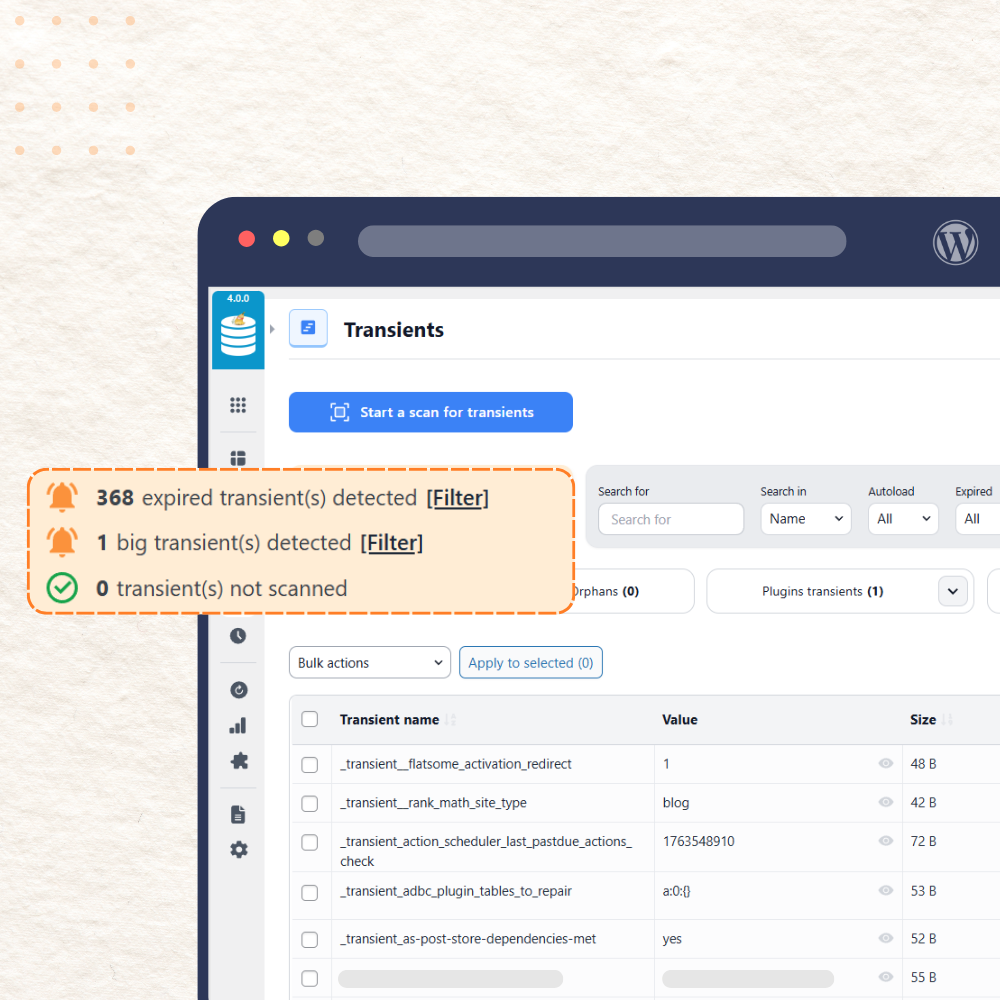
Transients Cleanup : Remove Expired & Orphaned Transients
List and clear WordPress transients to reclaim performance and prevent your database from being clogged by expired cache entries.
- Detect autoloaded expired transients
- Clean orphaned transients from deleted plugins
- Highlight big transients that take too much space
- Search and filter by transient name, size, status, etc.
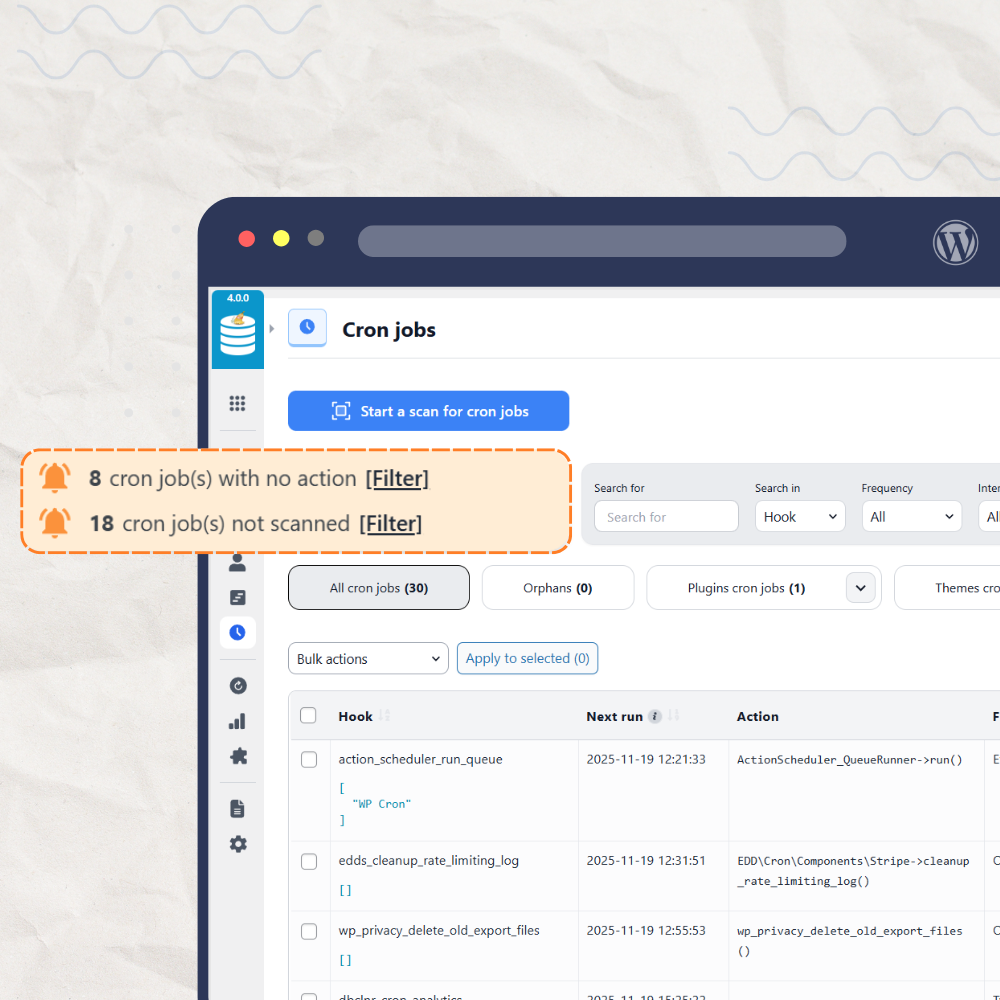
Cron Jobs Cleanup : Identify & Remove Orphaned Scheduled Tasks
View all WordPress cron jobs, identify orphaned tasks from deleted plugins or themes, and prevent unnecessary processes from wasting your server resources.
- List all cron jobs with next run times, frequency, etc.
- Identify orphaned cron jobs from deleted plugins
- Detect cron jobs with no associated action
- Filter cron jobs by name, frequency, and more
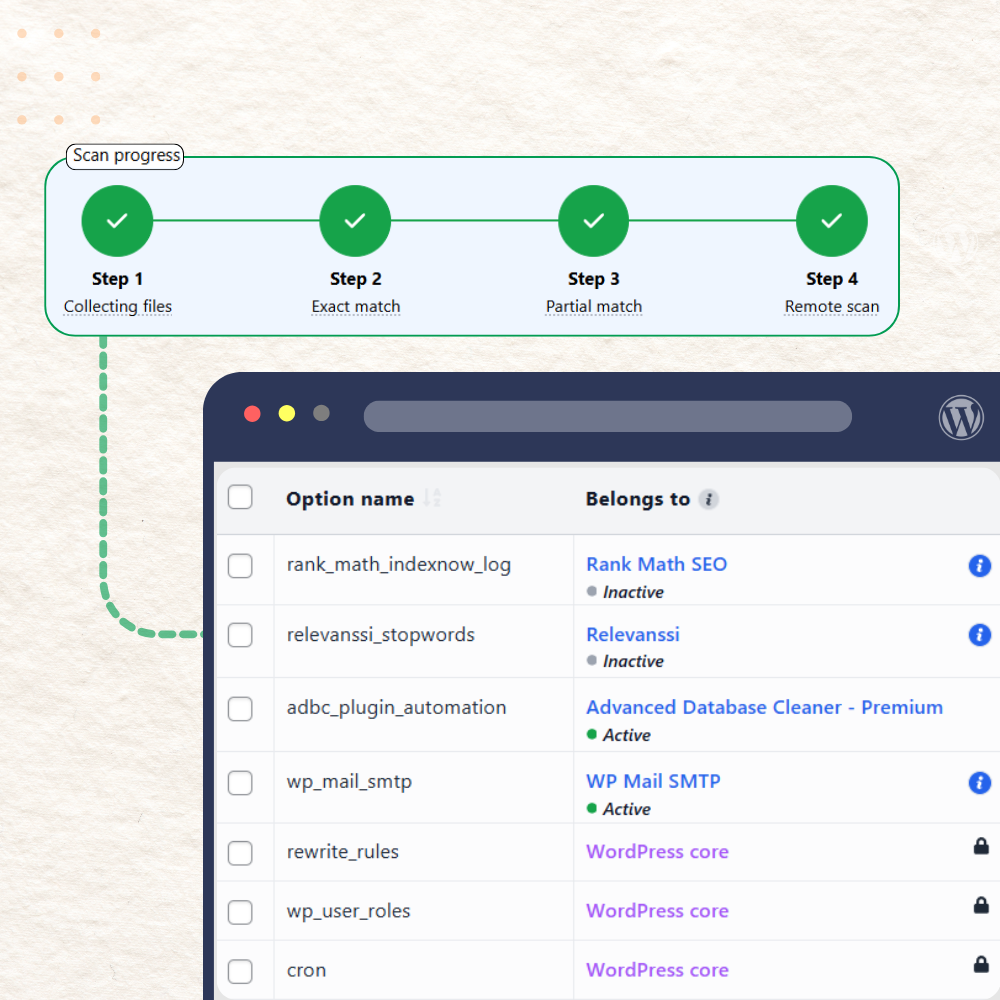
Our rebuilt scanner detects leftover data with high precision, helping you safely remove junk WordPress no longer uses. The scan runs in two complementary steps:
Local Scan
Performs a deep analysis of your posts, metadata, options and relations. By checking real links between objects, it identifies entries that point to deleted or missing content — the kind of data traditional cleanup tools often overlook.
Remote Scan
Validates findings against a curated database of plugin footprints. Combining local insight with remote intelligence dramatically reduces false positives and delivers the most reliable orphan detection we have ever released.
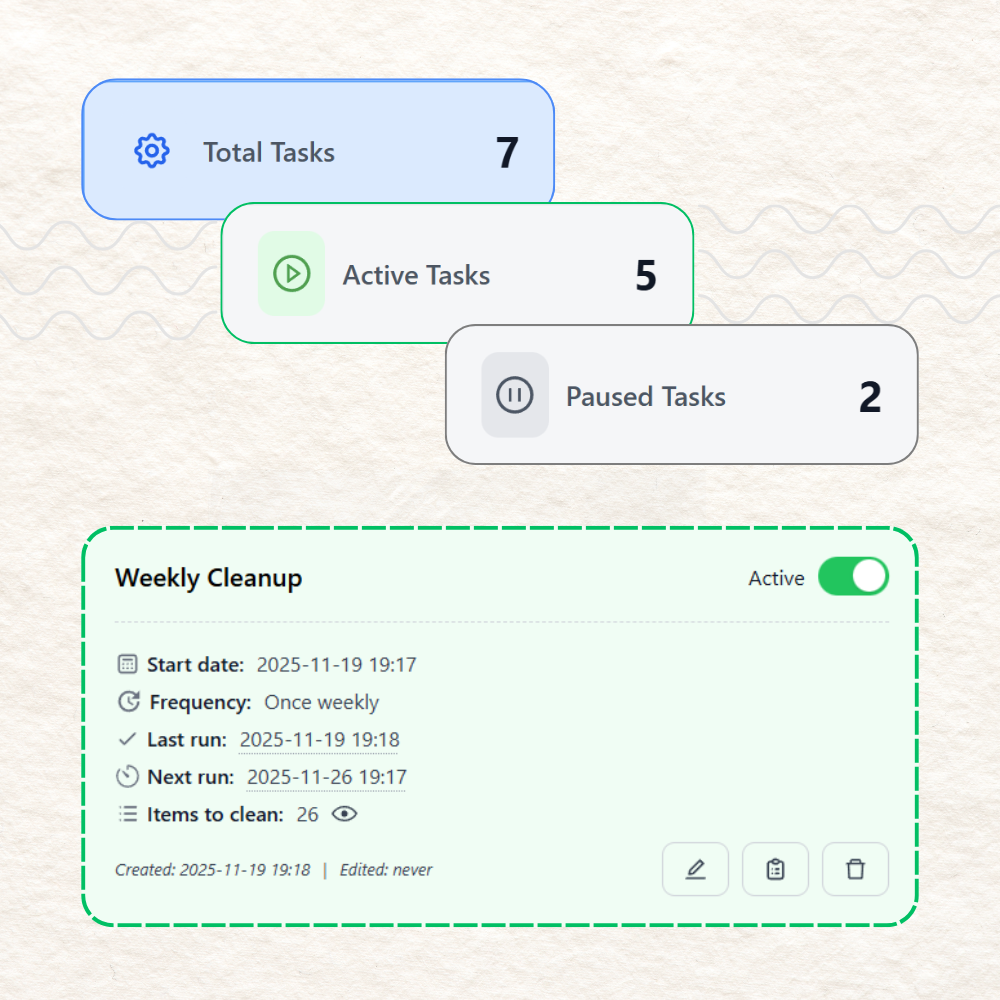
Automated Cleanup : Schedule Regular Database Maintenance
Set up automatic cleanups to keep your WordPress database optimized. Choose what to clean and how often, and the plugin handles the rest.
- Create multiple automated cleanup tasks
- Choose frequency: hourly, daily, weekly, monthly, etc.
- Check logs of automated cleanups for tracking
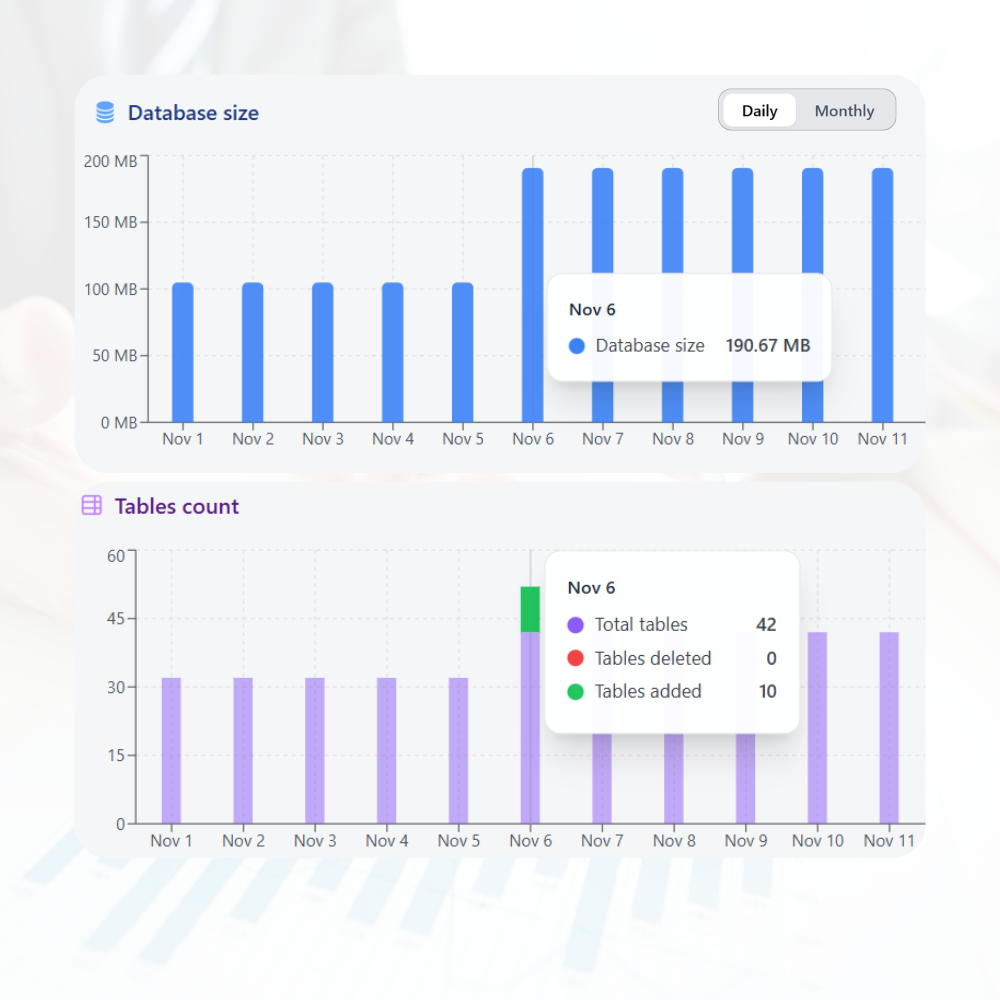
Database Analytics : Gain Insights Into Your Database
Get detailed analytics about your WP database size and tables growth over time to monitor trends and identify potential issues before they impact performance.
- Visualize database size trends over time
- Monitor tables count, size and rows growth
- See tables added/deleted over time
- Analyze specific periods with a custom date range
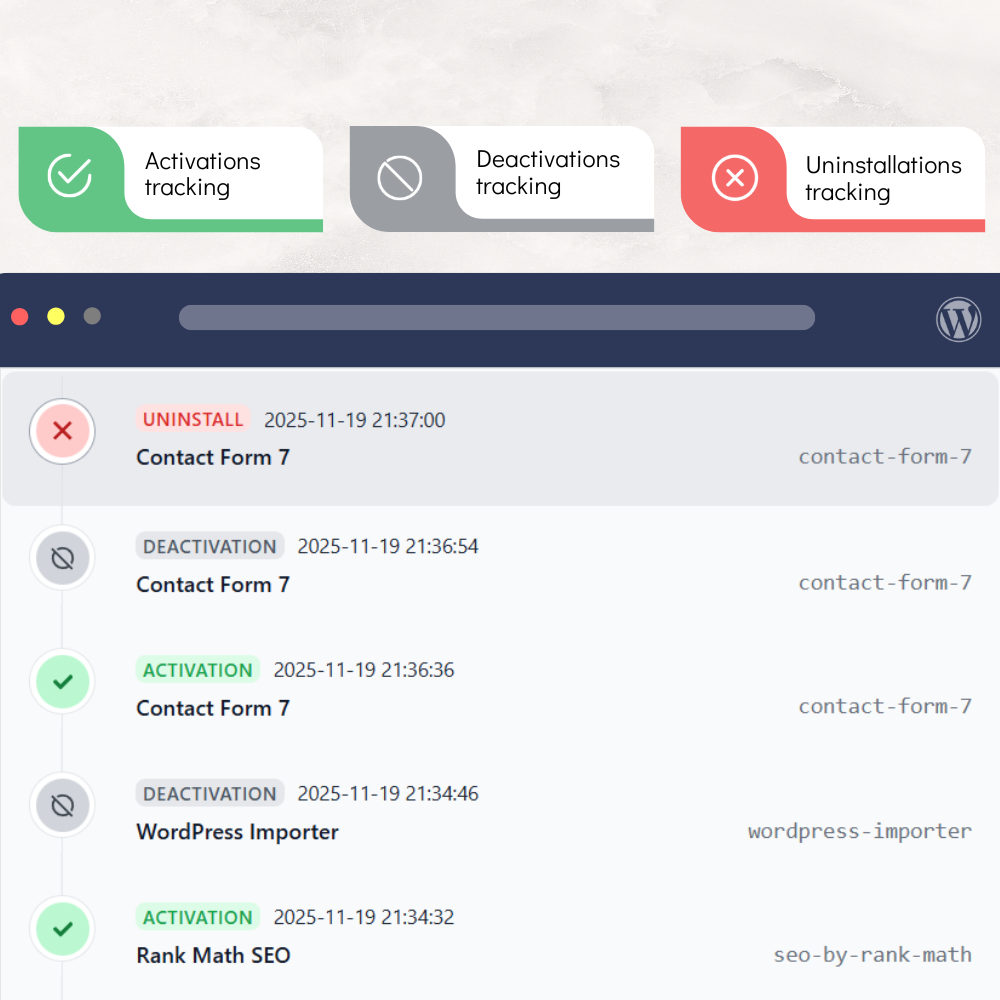
Plugin & Theme Monitoring : Keep Track of Add-On Activity
Track plugin and theme activity, including activation, deactivation, and uninstallation, and access a complete history for debugging and site analysis.
- View detailed logs of plugin and theme activity
- Track uninstallation to detect potential orphaned data
- Filter by add-on name or activity type
Even more flexibility with these features
Powerful features designed to give you complete control over your WordPress database
See what will be deleted before running a cleanup. No surprises!
Keep last n items or x days of data when cleaning. You decide what to clean and what to keep!
6 cleaners for Action Scheduler data to clean orphaned, failed, and completed actions and logs
Get notified about database issues and optimization opportunities directly under each cleanup section
Clean your database with a single click or select specific items to delete in bulk
Clean databases across all sites in your network from a single dashboard
Quickly find specific items to clean using powerful filters and search capabilities
Match your items against a curated cloud database for higher-accuracy ownership detection
Easily fix any false positives by correcting ownership directly from the scan results
Help improve our remote database by submitting your own corrections for better accuracy
Easily access system information and detailed logs for troubleshooting and support purposes
Tailor the plugin behavior to your needs with a variety of configuration options
Built on native WordPress functions, the plugin cleans your database safely, without relying on direct SQL queries
Built-in safety checks and confirmations to prevent accidental data loss during cleanups
Frequent updates to ensure compatibility with the latest WordPress versions and best practices
Don't Just Take Our Word for It
See what our customers say about their experience with our plugin and the dedicated support behind it.
Was very thorough
Did a good job cleaning out my database. I've had a WordPress site since 2010 and after many theme installs, plugins, and revisions I had a lot of orphaned junk and items running in the background that I didn't need.
@gcinardo

Make your website light
By cleaning the database, it becomes one of the things that makes your website light. And this plugin is very easy to use and meets your needs even in the free version. Thank u very much the author.
fahmineo
Works well & easy to use
Great plugin - easily frees up space on the server and shows exactly what you are clearing so you don't accidentally destabilize your database and cause site issues.
Clare Vanessa
Join thousands of satisfied WordPress site owners who trust our plugin
Frequently Asked Questions
Have a question? Browse our most frequently asked questions below for quick answers, or contact us, we're always happy to help.
Why do I need this plugin?
WordPress databases accumulate a lot of unnecessary data over time: revisions, transients, orphaned options, leftover data from removed plugins or themes, and more. This slows down your site and bloats your database. Advanced Database Cleaner gives you full visibility, safe cleanup tools, automation, and in-depth analysis to keep your database fast, efficient, and healthy.
Do I need technical or database knowledge to use the plugin?
No. The plugin is built to guide you safely. It includes health checks, warnings, safe deletion controls, and recommended cleanup actions so beginners and experts can both use it confidently.
Will the plugin break my site?
No. The plugin uses safe WordPress functions, includes warnings for sensitive items, and never deletes anything without your confirmation. However, we highly recommend taking a full backup of your site before performing any database cleanups.
Can I upgrade my license later?
Absolutely. You can upgrade at any time and pay only the difference between your current plan and the new one. No need to buy a full license again.
Can I deactivate my license from one site and use it on another?
Yes. You can deactivate your license from any site at any time and reuse it on a new site. Simply deactivate from the plugin's License page, or remove it from your account dashboard.
Is my license automatically renewed?
Only annual licenses renew automatically to provide uninterrupted access to updates and support. You can cancel the renewal at any time from your account. Lifetime licenses are a one-time purchase and never renew.
Is the plugin compatible with Multisite?
Yes. Advanced Database Cleaner supports multisite installations. Based on your plan, you can activate it on single sites or an entire network. Check the pricing table for details.
How does licensing work on Multisite (MU) networks?
On Multisite installations, one network counts as one activation, no matter how many subsites you have. If you activate the plugin on the network level, it covers the entire network without consuming extra activations.
Can I use the plugin on my clients' websites?
Yes. As long as your license allows multiple activations, you can use it on client sites. Many agencies use Advanced Database Cleaner Premium to maintain and optimize their clients' WordPress databases.
Do you offer a money-back guarantee?
Absolutely. We offer a 30-day, no-questions-asked, 100% money-back guarantee. If you're not satisfied, you get a full refund.
Do you offer a trial version?
We do not offer a trial for the Premium version. However, you can: (1) Use the free version to perform initial cleanups, or (2)rely on our 30-day money-back guarantee to test the full Premium version with complete peace of mind.
Is the plugin GDPR compliant?
Yes. The plugin does not store any personal data. For the remote scan feature, you can choose between: (1) Local scan only [no data sent externally], or (2) Local + Remote scan [non-sensitive items only, fully optional]. You remain fully in control.
What are the system requirements to run the plugin?
PHP: 7.0 or higher, and WordPress: 5.0 or higher. Works with most hosting providers, including shared, cloud, VPS, and dedicated servers.
Does the plugin work with big websites?
Yes. The plugin handles both small and large databases. For very large databases, you can adjust settings like batch sizes and time limits to optimize performance during scans and cleanups.
Do you offer support if I need help?
Absolutely. We are always happy to help. If your plan includes technical support, we can even look directly into your database, analyze the issues, and recommend the best cleanup steps.
Get Started Today
Take control of your WordPress database today. Choose the plan that fits your needs and experience the power of a clean, optimized database.
Resources
Technical specifications and helpful resources to better understand the plugin